
Which tool do you use when some design idea comes to your mind regarding the design of reports in Power BI?
Power BI offers many features such as shape, visual settings, etc…, to avoid bringing some pictures as a background and using just Power BI ability to design background. However, sometimes we are need of using an image based on the client’s request.
Personally, for diversifying my reports, I use a powerful software called Affinity Designer to design small icons that are related to report, and I add them to my visuals.
Affinity Designer, is a professional vector graphic design software. For more details about this tool, please visit here.
In this post, I will show you a quick example (for card visual), so that you can compare the Power BI card visual, before and after using an icon.
The first step after creating icons in Affinity Designer is to create the graphics with the selected colors we picked from our theme in the Power BI report. For this example, I simply picked a random color.

Once you make sure your icon design is complete, you can export that icon in any format that exists in Affinity Designer. I selected PNG format.

In this step, after saving the icon on your computer, you can insert this icon to the Power BI report by going to the Insert tab in Power BI >> select the “Image” and then choose icon:

The next step is adding icon to the card visual, so, put the image on top of the card visual and if it is not working by dragging the icon, go to the View tab in Power BI >> click on “Selection” >> select the “Layer Order“ and switch layers to order the image layer on top of card layer:
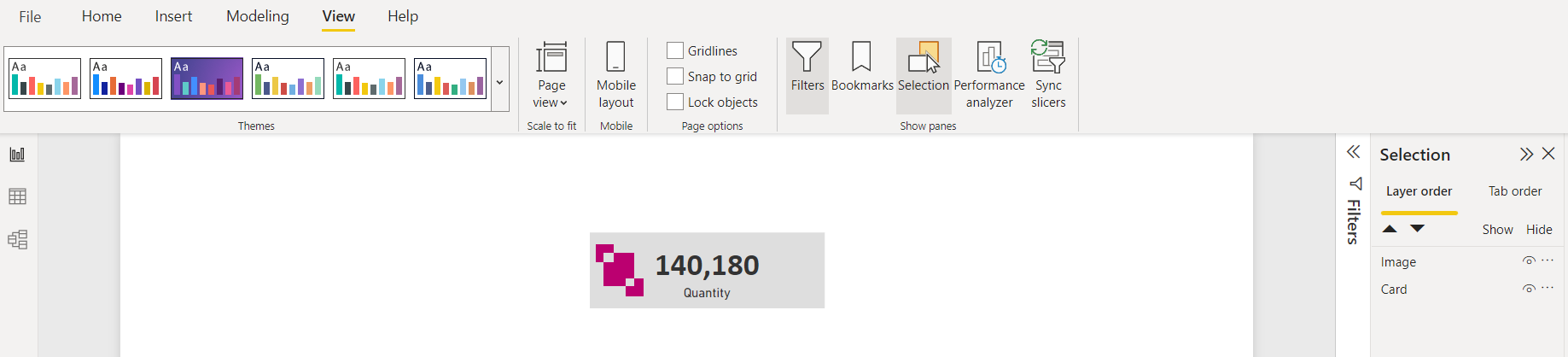
Next, we should group the icon and card visual so that we can move card visual around the report page easily. So, press Ctrl+Left-Click and select both card visual and icon, then Right-Click and select group. You can do this either on the Report page or the Selection pane:

Now, you should have the card visual with an icon ready to use in the report.

You can compare the card visual before and after having an icon on top of that.
Let me know your idea and which tools you use to improve your design? comment your thoughts. 👊

 Atefeh BI
مثل همیشه عالی
LikeLike
my pleasure dear Hossein
LikeLike
ممنون بابت اشتراک گذاری اطلاعات
LikeLike
I’m glad you liked it. 😊
LikeLike